
 Spot HR
Leave Analytics for Small Businesses: What to Track Before Absence Becomes a Problem
Posted June 10, 2026 by Spot HR ‐ 9 min read
Leave data should help a small business answer simple questions: who is off, how much leave is being used, where absence is increasing, and whether managers have enough visibility to plan around it.
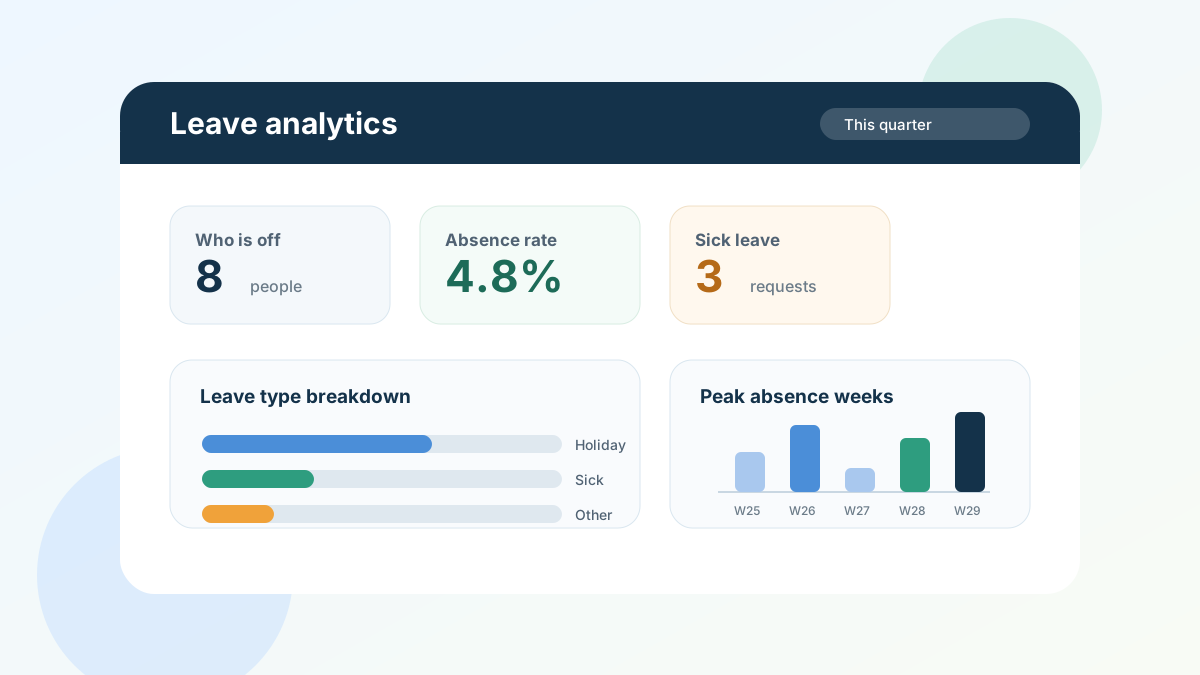
Leave analytics should make planning easier, not more complicated
Most small businesses start tracking leave for one reason: they need to know who is away and how many days each person has left.
That is a good start. But as the team grows, the questions become more useful:
- Are certain weeks becoming difficult to staff?
- Is sick leave increasing in one team?
- Are people taking enough holiday before year end?
- Which managers need better visibility before approving requests?
- Will upcoming absences affect customer work, payroll, or delivery dates?
That is where leave analytics matters.
Leave analytics is not about turning HR into a reporting department. For a small business, it is about using absence data to make better day-to-day decisions before a problem becomes obvious to everyone.
If leave is still managed in spreadsheets, these questions are hard to answer. Someone has to open the file, check formulas, filter dates, compare leave types, and hope the data is up to date. A simple leave management workflow should make the important patterns visible without that manual work.
What is leave analytics?
Leave analytics means turning leave requests, sick leave, public holidays, and balances into useful information.
At its simplest, it helps you understand:
- who is currently off or scheduled to be off
- how many leave days have been taken in a period
- how much leave remains across the team
- how absence is split by leave type
- whether absence is concentrated in certain weeks or teams
- where managers may need to plan cover earlier
For a large company, absence analytics can become a full workforce-planning discipline. For a small business, the goal is more practical: avoid surprises.
You want to know early when too many people are away in the same week, when a team has unusual sickness patterns, or when several employees still have large balances close to the end of the year.
The leave metrics small businesses should track
You do not need dozens of HR metrics. Start with the ones that help managers make decisions.
1. Who is off during the selected period
The most useful report is often the simplest one.
Managers need a clear view of who is away this week, next week, this month, or during a custom date range. That view should include approved leave, relevant sick leave, and any other leave types that affect planning.
This helps with:
- scheduling customer support coverage
- planning handovers before holidays
- spotting clashes before approving new requests
- avoiding last-minute questions in chat
- keeping project deadlines realistic
If this information is buried in a spreadsheet, managers will keep asking HR or operations for updates. If it is visible in a report, they can plan without interrupting anyone.
2. Total leave days taken
Total leave days show how much absence has been recorded across the business in a specific period.
This is useful for simple trend checks. For example:
- Is this quarter heavier than last quarter?
- Did summer leave peak earlier than expected?
- Are public holidays being counted correctly?
- Is the team carrying too much unused leave into the end of the year?
The number is not useful on its own unless you compare it with context. A holiday-heavy month will naturally look different from a normal working month. The value comes from seeing the pattern over time.
3. Average days per employee
Total leave can rise simply because the company is growing. Average leave days per employee gives you a cleaner view.
For example, a company with 40 people will naturally record more absence than a company with 12 people. But if the average per employee changes sharply, it is worth looking closer.
This metric can help you understand whether leave usage is normal, seasonal, or concentrated in a way that needs attention.
4. Absence rate
Absence rate gives you a percentage view of how much working time is affected by leave during a period.
For a small business, you do not need to over-engineer the calculation. The point is to see whether absence is low, normal, or unusually high for the size of the team and the time of year.
A rising absence rate might be completely explainable. It could be school holidays, a planned shutdown, or a period where people are finally using carried-over leave. But it can also highlight staffing pressure, burnout risk, or a process issue that managers should understand.
5. Sick leave count
Sick leave should be visible separately from planned holiday.
That does not mean treating every sick day as a problem. People get ill, and small teams should handle that with common sense. But sick leave is operationally different from planned leave because it is less predictable and often needs faster cover.
A simple sick leave count can help you notice:
- sudden increases in unplanned absence
- repeated short absences
- teams that may be under pressure
- periods where managers need better backup plans
Spot HR supports sick leave workflows separately from deductible leave balances, so businesses can track sickness without treating it like annual holiday.
6. Leave type breakdown
A leave type breakdown shows how absence is split across categories such as holiday, sick leave, unpaid leave, parental leave, or custom types your organisation uses.
This helps because different leave types require different responses.
Holiday usage may suggest people are planning well. Sick leave may require manager awareness. Unpaid leave may need payroll visibility. Custom leave types may reflect policies that are important in your business.
A breakdown also helps you check whether employees are using the right categories. If everything is being submitted as one generic type, your reports will not tell you much.
7. Peak absence weeks
Small businesses feel absence most when it clusters.
One person away is usually manageable. Four people away in the same week can change what the team can deliver.
Peak absence weeks help you identify periods where cover may be tight. That is especially useful before:
- school holidays
- public holiday weeks
- product launches
- customer deadlines
- payroll cutoffs
- finance month end
The goal is not to block people from taking leave. The goal is to approve leave with enough visibility to plan work responsibly.
Why spreadsheets make leave reporting harder than it should be
A spreadsheet can track dates and balances for a while. Reporting is where it usually starts to struggle.
Common problems include:
- managers cannot easily see the same live view
- formulas break when policies change
- sick leave and holiday are mixed together
- public holidays are added manually
- different teams maintain different versions
- historical data is hard to compare
- nobody is fully sure whether the report is current
The more questions you ask of the spreadsheet, the more fragile it becomes.
That is why many small teams move from spreadsheets to dedicated leave management software for small teams. They do not need complex enterprise reporting. They need reliable answers without manual cleanup.
How managers should use leave analytics
Leave analytics is only useful if managers actually use it.
A simple rhythm works well for most small businesses.
Weekly: check who is off
At the start of each week, managers should check who is away and whether any handovers are needed.
This is a planning habit, not an HR ritual. It helps teams adjust meetings, deadlines, customer ownership, and internal cover before the week gets busy.
Monthly: review leave patterns
Once a month, check the broader pattern:
- total leave days
- average days per employee
- sick leave count
- leave type breakdown
- upcoming busy weeks
This gives managers a chance to spot issues early. It also helps operations or HR answer questions without building a custom report every time.
Quarterly: look at balances and policy pressure
Every quarter, review whether employees are using leave in a healthy and practical way.
Look for people with unusually high remaining balances, teams with repeated absence pressure, or policies that are creating confusion. For example, if people are not using holiday until the final quarter, managers may need to encourage earlier planning.
What to look for in leave analytics software
When comparing tools, avoid being distracted by dashboards that look impressive but do not answer everyday questions.
For a small business, leave analytics software should help you:
- select practical time periods such as this month, last month, this quarter, this year, or a custom range
- see who is off during the selected period
- export useful lists when needed
- understand total and average leave days
- separate sick leave from other leave types
- view a leave type breakdown
- identify peak absence weeks
- connect reporting to real approval and balance data
The last point matters most. A dashboard is only useful if it is based on the same workflow employees and managers use every day.
Spot HR’s leave analytics report is built into the staff area for admins. It shows absence activity for a selected period, including who is off, total days, average days per employee, absence rate, sick leave count, leave type breakdown, and peak absence weeks. It sits alongside practical staff tools such as leave balances and the org chart, so reporting stays connected to the work managers already do.
Connect leave analytics with the rest of HR
Leave data becomes more useful when it is not isolated.
For example:
- onboarding affects when new employees become productive
- public holidays affect leave calculations and staffing plans
- expense approvals can be delayed if approvers are away
- employee records help managers understand team structure
- org charts make absence planning clearer across reporting lines
That is why leave analytics should sit inside the broader HR workflow, not in a separate spreadsheet that only one person updates.
Spot HR connects leave management with practical small-business HR workflows, including employee onboarding, expense claims, staff records, leave balances, public holidays, and manager visibility.
A simple leave analytics checklist
If you are setting up leave reporting for the first time, start here.
Data to keep clean
- Employee name and team or manager
- Leave type
- Start and end date
- Approval status
- Working hours or leave calculation basis
- Public holidays
- Remaining balances
Reports to review
- Who is off this week or month
- Total leave days in the period
- Average days per employee
- Sick leave count
- Leave type breakdown
- Peak absence weeks
- Employees with high remaining balances
Habits to build
- Managers check upcoming absence weekly
- Admins review patterns monthly
- Leave balances are checked before busy periods
- Public holidays are configured before the year starts
- Sick leave is tracked separately from holiday
- Reports are exported only when needed, not rebuilt manually every time
Final takeaway
Leave analytics for a small business should be practical. It should help you plan cover, understand absence patterns, and give managers enough visibility to make better decisions.
You do not need a complex HR reporting suite to do that. You need accurate leave data, clear reports, and a workflow people actually use.
If your team is still trying to answer absence questions from spreadsheets, start by improving the leave workflow itself. Explore Spot HR’s leave management feature, compare leave management for small teams, or sign up for Spot HR to bring leave requests, balances, public holidays, and analytics into one place.